What's New at Union Micro
July 6 - Counterfitters
May 29 - Upcoming Site Upgrade
December 19 - Tweet!
December 9 - Gift Hunt
 
Product Updates
January 15 - Elevator 2.5.1
November 15 - New Shells and Scripts!
July 29 - Elevators updated
February 7 - V2 Templates
 
Upcoming Products
Support Center
5%
5%
More v2 Shells
100%
100%
SpeakTech
100%
100%
Postmaster
100%
100%
v2 Elevator
100%
100%
 

November 11, 2005

Vendor, Sales Report, & Delivery System

Filed under: New Products — Stylez Gomez @ 8:09 pm

What you get:

  • Full-Feature Vendor
  • Sales Server
  • Delivery Server
  • Scripts to integrate this system with JEVN and SL Exchange*

  • Example scripts to integrate with your own vendors

*These are provided as-is. I cannot guarantee their functionality with future versions of said products.

(more…)


November 8, 2005

Pick a Number – Open-source

Filed under: New Products — Stylez Gomez @ 2:47 pm

I’ve just open-sourced my Pick a Number casino game. You can find it on SL Exchange and in-world at Union Micro.
(more…)


November 6, 2005

Layout pretty much complete

Filed under: Site Updates — Stylez Gomez @ 10:26 am

The site layout is done, I think. I tried to carry over the WordPress theme into the forums as best as I could. I also installed the attach mod into the forums, so you can attach files to your posts… but this is a feature I installed for me, not the posters. The point of the forum is for people to get information about Union Micro… it’s not really meant to be an active social environment; although I wouldn’t argue! I got rid of the “Download Engine” and started a Downloads forum, I think that will be a little more intuitive. So, now that the meat & potatoes are there, I guess it’s time to start carrying the old news over from the old news system. I plan on adding more features to WordPress and the forums soon.


November 5, 2005

Giving WordPress a try…

Filed under: Site Updates — Stylez Gomez @ 2:44 am

Well I’m going to give this WordPress blog software a try… I’m not sure how good it will work out for this type of site, so hopefully I can customize it to work for me. I was using DMA News, and that was working out great, but then something changed on the server-side configuration and DMA News wouldn’t run anymore. After I get all this setup with navigation menus (other than the stupid defaul blog-y ones), and a Union Micro-ized layou, I’ll be copying the old news over from the DMA News database. Anyway, wish me luck!


November 4, 2005

New HUD attachments!

Filed under: New Products — Stylez Gomez @ 10:45 am

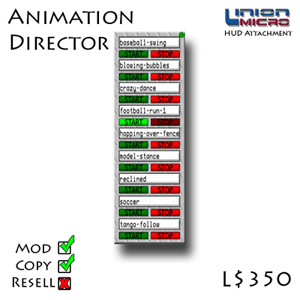
Animation Director
This brand new HUD attachment is a dream come true for all of the models, actors, and other people in SL who rely on being able to play animations at the click of a button. No more fidgeting with opening animation windows out of your inventory, only to have to re-open them when you choose to stop playing the animation.

You get 2 different Animation Directors in this package:

  • Notecard version
  • Inventory-drop version

What’s the difference? The inventory-drop version allows you to simply add animations into the contents folder, and it will automatically load them in alphabetical order. The notecard version allows you to specify which animation shows up in which spot. This allows you to sort your animations whichever way you want!

Current Features:

  • Drag & Drop and Notecard versions
  • 9 animation slots
  • Each slot has a Start and Stop button and the name of the animation in it
  • Can be used as a HUD attachment or placed in-world
  • Power button used to reload all animations and to force an animation to stop
  • All chat is private to the owner only

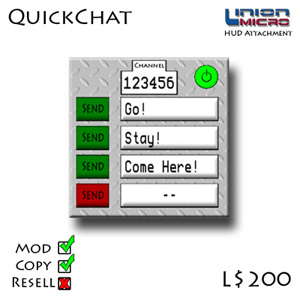
QuickChat

The QuickChat HUD attachment is the essential tool for quick communications. With 4 programmable slots, you can quickly communicate with other QuickChat users at the push of a button. Simply edit the notecard inside, hit the power button, and away you go! All messages are received in format "QuickChat: Owner of talking QuickChat: Message," so there should never be any confusion as to what you are hearing.

This is great for anyone that needs to coordinate an event in-sync with other events such as timing a fashion show, directing an in-game movie or playing a fast paced game in-world where typing just isn’t an option.

Current Features:

  • Select your own chat channel (other than 0*)
  • 4 Programmable buttons
  • Buttons are colour-coded for clarity: red for empty slots, green for active slots
  • Can be used as a HUD attachment or placed in-world — use it like a switch to control objects that listen on specific channels
  • All chat is private to the owner only

*I disallowed channel 0 to: a)prevent chat spam/abuse, b)to prevent lag. If channel 0 is selected in the notecard, the QuickChat will not start.

QuickChat is required by other users to hear your QuickChat text, unless other devices are used to listen on the channel you set.



Second Life® and Linden Lab® are trademarks or registered trademarks of Linden Research, Inc.
All rights reserved. No infringement is intended.
Union Micro™ is not affiliated with or sponsored by Linden Research.


Add to Google Add to My Yahoo! Subscribe with Bloglines Add to Technorati Favorites!
Follow us on Twitter!